
Application
Creator Desk
Legal
SMS Notifications Policy
This page describes Creator Desk's SMS account-notification program, including exactly how users opt in. It is the public reference for our text messaging program.
1. What the program is
Creator Desk sends optional, account-related notification texts to registered users who explicitly opt in — for example, a text when a sale lands on the user's linked TikTok Shop account, when a brief is assigned to them, or when an account connection needs attention. These are transactional account notifications; we do not send marketing or promotional SMS.
2. How users opt in
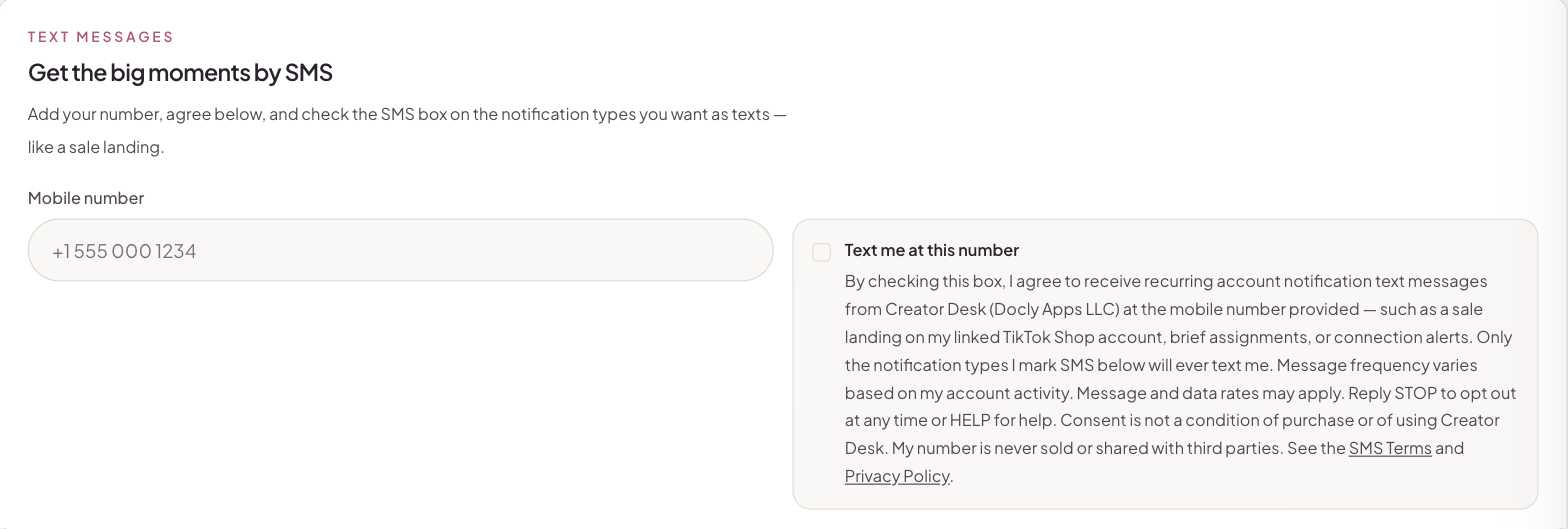
Opt-in happens inside the product, on the Notification Preferences page (Settings → Notifications), and requires explicit action. It is never pre-checked and never required to use Creator Desk:
- The user enters their mobile number.
- The user checks an unchecked-by-default consent box carrying the full consent agreement (quoted verbatim in section 3 below).
- The user selects which specific notification types may be sent by SMS. Only those types are ever texted.
The consent timestamp is stored with the user's account. This is what the opt-in step looks like:
3. The consent agreement, verbatim
The consent checkbox carries this exact language, shown before the user can agree:
"By checking this box, I agree to receive recurring account notification text messages from Creator Desk (Docly Apps LLC) at the mobile number provided — such as a sale landing on my linked TikTok Shop account, brief assignments, or connection alerts. Only the notification types I mark SMS below will ever text me. Message frequency varies based on my account activity. Message and data rates may apply. Reply STOP to opt out at any time or HELP for help. Consent is not a condition of purchase or of using Creator Desk. My number is never sold or shared with third parties."
4. Message frequency
Frequency varies with the user's account activity and the notification types they selected — for example, a creator whose videos are selling may receive several sale notifications in a week, while others may receive none.
5. Opting out and help
Users can stop all texts at any time by replying STOP to any message, or by unchecking the consent box (or removing their number) on the Notification Preferences page. Replying HELP returns help information. Support is available at any time via the contact details on our privacy policy page.
6. Privacy
Phone numbers and SMS consent records are used only to deliver the account notifications described above. No mobile information is sold, rented, or shared with third parties or affiliates for marketing or promotional purposes. See our Privacy Policy and Terms of Service.